> You can use Tulip to make music, code, art, games, or just write.
Am I wrong to think statements like these are just aspirational warm-and-fuzzies about the product without any real substance?
You could do all those things on anything, but they are typically incongruent with one another. If you are a beginner or a pro, you’re going to be better off doing it on a “more-standard” device.
* I can read and understand every line of code that is running
* I can understand all of the hardware it's running on
We've gotten so used to computers not working. Weird stuff breaks all the time and even experts can only guess why beyond turning it off and on again, which takes minutes for most devices.
I dream of a world where we trust computers to work and be fast. It's completely possible, but step one is reducing complexity by several orders of magnitude.
I'm particularly sensitive to shallow critiques of new ways of computing, particularly those that encourage and enable people to be creative. Whether a project is successful or not, it's nice to see something that isn't a "bootup your general purpose comouter and then immediately open a browser" style of computing.
Attempting to get people to interact with the real world and also be creative should be commended.
It’s the “You can do anything (… at Zombo.com [1])” angle.
I’ve been lulled into novel only-limit-is-your-imagination work environments that try to convince me to think they will be “transcendental” in my abilities.
A little while later, I run into software or hardware limitations only to face a physical malaise because I’d been troubleshooting a hardware or software problem for hours.
Take the “just write” angle. I do technical writing. I don’t trust that the built-in dictionary for that device is ever going to meet my spellcheck needs. I need mah Microsoft Word that I know how to navigate like the back of my hand, and I’m set.
Don’t promise a “Zombocom” device that doesn’t actually deliver.
You're wrong, it explains what you can do with this pocket computer. Of course you could do the same and more with any standard device but the point here is to have a small cheap device to play and hack, not be a replacement for a MacBook.
Agree with the above. As someone who has never heard of this before, the description of "a portable programmable device for music, graphics, code and writing" reads to me as "a computer". I'm kind of unsure why I would want to use this instead of the computer I'm typing on right now.
This seems to be targeting the market of users with the following intersecting interests:
* DIY hardware enthusiast
* musician
* python developer
* maybe also wants graphics...?
Seems a small segment to me, but I assume I'm missing something here.
An immediate benefit I see is that they're cheap enough to use once - you could make/find/buy a software instrument that you like, then put it in your gear bag and never reflash it. Now it's just like any other synth. Then you can get a second Tulip and do the same thing later if you like. You could do this with laptops of course but it starts to get expensive.
The Pocket Operators have something similar (the KO at least, maybe the others). If you've written samples into them you want to preserve for playing live, you can snap a tab off and then they're read-only - no surprises on gig night.
The GP also mentions X11 Terminals. My wiki-fu shows the X Windowing System came about on or around 1983, while Cray-1 was 1970s vintage. I assume that was an upgrade at some later point.
X Window Release 3 (X11R3) was introduced on Cray into UNICOS (a UNIX variant of Cray OS, COS) in late 1989 using ported 64-bit Xlib. But it was not widely used within small Cray community.
But MIT cooked up X11 "PROTOCOL" of Xlib in late 1985 to 1986 on Univac and Unix in C with many other X libraries written in Common Lisp.
X10R3 mostly stabilized the Xlib around a few platforms and CPU architecture (DDX) in a"long" preparation for X11R1 in September 1987.
It was fat finger memory. it was X10R3 or something similar, which I had previously used in UCL on Ultrix machines in the 80s. I don't think it was R5, I don't think much got upgraded in that space but .. it was a long time ago.
This was a SECOND HAND cray. It was a tax contra made in the 90s when Boeing sold a lot of stuff to the Australian Defence forces, and to avoid a massive tax burden donated science trash to the uni.
This. The “mobile-ization” of desktop interfaces is a bane on current computing. The metaphors of work between desktop and mobile devices are wildly different.
Obligatory car analogy: a mechanic working in his shop has a completely different set of tools available than if he was going into the field to fix a car.
> I really think GNOME is good at making an interface that works well on both,
I agree with the comment from @zak on this.
I have to disagree.
I have used GNOME (both GNOME Mobile and Phosh) on phones, and it makes more sense there, but it's still a bit clunky and fiddly.
Example: you only get half the tiny screen for your app launcher. So it fills up fast. So, you put apps in groups. BUT you can't pin groups to the fast-launch bar thing.
On the desktop, IMHO it does not work well. It works minimally, in a way that's only acceptable if you don't know your way around a more full-featured desktop. It feels like trying to use a computer with one hand tied behind my back. Yes, it's there, it's usable, but it breaks lots of assumptions and is missing commonplace core features.
Simple features: desktop icons are handy.
GNOME: ew, how ugly and untidy! We're taking them off you.
Obvious but complex features: menu bars go back to the 1970s and by the mid-1980s were standardised, with standard shortcut keys, with standardised entries in standardised places. They work well with a mouse, they work well with a keyboard, they work well with screenreaders for people with vision disabilities.
GNOME: Yeah, screw all those guys. Rips them out.
Non-obvious but core features: for over 30 years in Linux GUIs, you could middle-click on a title bar to send it to the back of the window stack.
GNOME: screw those guys. Eliminates title bars.
No, GNOME does not work _well_ on both. It is sort of minimally usable.
On both, it's minimally functional if you are not fussy, don't want to customise, don't have ingrained habits, and don't use keyboards and keyboard shortcuts much.
I actually think GNOME works best with the keyboard, they put a lot of effort into ensuring you can do everything without a mouse do to accessibility reasons. Even with a mouse, I don't hate the larger buttons. It means I don't have to be as precise with my mouse clicks.
I also think it breaking traditions is a good thing. It feels weird at first but without someone trying something new we won't see any progress. I do think they're a bit fast to do away with things they see as outdated but GNOME has a very particular design anyway that lets you get shit done when you learn it
It worked in Windows 2 and 3 and everything since. It worked in DOS since about 1990. It worked in OS/2. It works in Xfce, and up to a point in LXDE, LXQt, GNOME 1/2, MATE, Cinnamon, EDE, XPde, and lots of other Linux and xBSD GUIs. A form of it works on MacOS.
But GNOME ripped the whole UI out and has re-invented a worse version of its own. (KDE has partially kept something like it but changed half the keystrokes, which is almost worse.)
If you're blind or have some disability that stops you using a mouse, say, this makes it a TONNE more work.
I dislike Gnome on a pure desktop or non-touch laptop, in part because of UI decisions I think are meant to work better on a touchscreen. It's really good on a touchscreen though aside from the horrid onscreen keyboard.
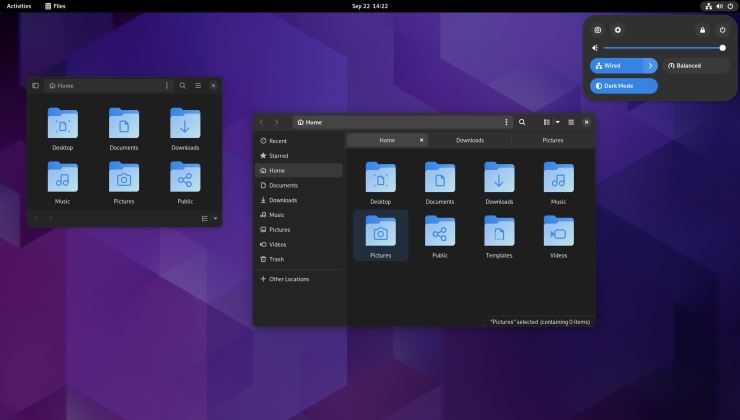
I think it's called "quick settings" (top right on https://www.gamingonlinux.com/uploads/articles/tagline_image... ) where the power, internet, etc menus are. I think that's mostly just the thing that I remembered most aside from the shortcuts menu changes, but it was mainly the fact that I couldn't patch in my need for customization with extensions well enough anymore that made me realize GNOME wasn't my thing. It was just what was there when I started and I worked around it.
I’m in the midst of a backup-to-local project and, with this post to HN, I’m worried an Apple project manager will be on a mission this morning to get his team to cripple this software.
My personal pet peeve is the GTK/Qt divide. Theming has an extra step, as you have to pick a matching theme for the other toolkit apps you inevitably end up using.
KDE/Qt has excellent scaling support, but GTK apps (OrcaSlicer for example) end up having blurry text or messed up text labels if you run a non-integer scaling resolution.
The Wayland transition almost seems akin to the IPv6 debacle. Support is there, but it’s half-baked in half the cases. I crave RDP remote access, but this is currently not possible with KRDP as it does not work with Wayland sessions. Wine is just getting there, but only with scary messages that say that it’s an experimental feature.
We at out Uni provide default Ubuntu installs on laptops. Most people just live with whatever UI.
I have a feeling that many have stopped configuring, themeing etc. those only from 80s to 2000 were just spending lots of time building and creating many themes like matrix etc.
Also people are so addicted to smartphone. That is the main place for their heart.
> My personal pet peeve is the GTK/Qt divide. Theming has an extra step, as you have to pick a matching theme for the other toolkit apps you inevitably end up using.
Is this perhaps an issue of fractional scaling? I’ve run Openbox/Blackbox on Linux for ~15 years and never had these issues. Not 100% sure I understand the issue at least.
Things look mostly fine (to me) and even if they don’t, the apps still work as they should (no blur). AFAIK Openbox/X11 just uses the DPI the monitor reports and things scale as they should.
Sounds like an issue with Gnome/KDE to me, not with Linux?
I may be wrong, I’m not seeking a super polished look or want to tweak my UIs a lot.
Yes, this is a KDE/GTK issue, but this is also a real-world case.
Linux Greybeards, a hypothetical man with astute technical and sexual prowess, might not be bothered by follies such as proper text rendering, but it is an issue if desktop environments have any chance to compete with mainstream operating systems.
> Yes, this is a KDE/GTK issue, but this is also a real-world case
I believe you when you say it.
> Linux Greybeards, a hypothetical man with astute technical and sexual prowess
No need to be snarky. I was speaking from my own Linux experience (just like you did?), not trying to impress anyone.
Text renders fine in Openbox, hence the question about the issue being with Linux or GTK/KDE. I’ve honestly never heard of these issues or experienced them myself. Perhaps because Openbox is simpler (no fractional scaling AFAIK) so I’ve likely been “shielded” from such issues (never heard about theming or issues like this tbh).
> Cyberpunk barely hits 16 FPS average on the Pi 5.
This is a lot better than my memories of forcing a Pentium MMX 200 MHz PC with 32 MB SDRAM and an ATI All-in-Wonder Pro of running games from the early 2000s.
I'm pretty sure I completed Morrowind for the first time ever using both wine and a celeron. Likewise before that with VirtualPC (remember that?) on Mac OS (note the space!) and Age of Empires (not even Rise of Rome!).
Single-digit FPS can _absolutely_ be playable if you're a desperate enough ten-year-old...
When I played (original vanilla) WoW I remember getting 2-3 fps in 40 player raids. The cursor wasn't tied to the game's framerate though. So with the right UI layout made from addons I could still be a pretty effective healer. I don't even remember what the dungeons looked like, just a giant grid of health bars, buttons and threat-meter graphs.
This would have been on some kind of Pentium 4 with integrated graphics. Not my earliest PC, but the first one I played any games on more advanced than the Microsoft Entertainment Packs.
> When I played (original vanilla) WoW I remember getting 2-3 fps in 40 player raids.
I had to look at the ground and get the camera as close as possible to cross between the AH and the bank in IF. Otherwise I’d get about 0.1 fps and had to close the game, which meant waiting in line to get back. Those were the days.
> So with the right UI layout made from addons I could still be a pretty effective healer.
I got pretty good with the timings and could almost play without looking at the screen. But I was DD and it was vanilla so nobody cared if I sucked as long as I got far away with the bombs.
> I don't even remember what the dungeons looked like, just a giant grid of health bars, buttons and threat-meter graphs.
I was talking a couple of weeks ago with a mate who was MT at the time and told me he knew the feet and legs of all the bosses but never saw the animations or the faces before coming back with an alt a couple of years later. I was happy as a warlock, enjoying the scenery. With a refresh rate that gave me ample time to admire it before the next frame :D
I've only ever played Skyrim on a 2009 13" MacBook Pro in Wine. It took like 30min to load and ran at like 4fps. But I didn't play past the first area.
Wasn't AoE1 released for PPC Mac natively? AoE2 was probably the best Mac game ever.
My Geforce2 MX 200/400 with an Athlon and 256MB of RAM began to become useless in ~2002/2003 with the new DX9 games.
Doom3? Missing textures. Half Life2? Maybe at 640x480. F.E.A.R? More like L.A.U.G.H.
Times changed so fast (and on top of that, shitty console ports) that PCs didn't achieve
great numbers at home until 2009 with a new machine.
Altough I began to play games like Angband, Nethack and the like in that era and in opened an amazing libre/indie world until today.
And, yes, I replayed Deus Ex because it had tons of secrets and it ran on a potato. Perfectly playable at 800x600 at max settings.
Whatever, Glide was amazing! So much so that Nvidia bought them.
I remember what a huge difference it was having a dedicated 3D card capable of fast 2D and 3D vs the software rasterizer. Yes, NovaLogic games ran better. Yes, you can play Doom at decent FPS. Yes, SpecOps ran at full monitor resolution. They had a LOT to brag about.
Glide is precisely what made me hate 3dfx and was glad they died.
As a developer, I'm sure Glide was great.
But as a kid that really wanted a 3dfx Voodoo card for Christmas so I could play all the sweet 3D games that only supported Glide, I was upset when my dad got me a Rendition Verite 2200. But I didn't want to seem ungrateful, so my frustration was pointed to 3dfx for releasing a proprietary API.
I was glad that Direct3D and OpenGL quickly surpassed Glide's popularity.
But yeah, then 3dfx failed to innovate. IIRC, they lagged behind in 32-bit color rendering support as well as letting themselves get caught with their pants down when NVIDIA released the GeForce and introduced hardware transform which allowed the GPU to be more than just a texturing engine. I think that was the nail in 3dfx's coffin.
lol, agreed. Today, Glide feels like a predecessor to OpenGL. At the time it was awesome but as soon as DirectX came around along with OpenGL it was over. 1999 was the beginning of the NVidia train.
Thanks for the laugh about your disappointment with your dad. I had a similar thing happen with mine when I asked for Doom and him being a Mac guy, he came back with Bungie’s Marathon. I was upset until I played Marathon… I then realized how wise my father was.
That line triggered some deep memories of tweaking config files, dropping resolutions to something barely recognizable, and still calling it a win if the game technically ran
When things like this (or Vello or piet-gpu or etc...) talk about "vector graphics on GPU" they are near exclusively talking only about essentially a full solve solution. A generic solution that handles fonts and svgs and arbitrarily complex paths with strokes and fills and the whole shebang.
These are great goals, but also largely inconsequential with nearly all UI designs. The majority of systems today (like skia) are hybrids. Things like simple shapes (eg, round rects) have analytical shaders on the GPU and complex paths (like fronts) are just done on the CPU once and cached on the GPU in a texture. It's a very robust, fast approach to the wholistic problem, at the cost of not being as "clean" of a solution like a pure GPU renderer would be.
> I am curious if the equation of CPU-determined graphics being faster than being done on the GPU has changed in the last decade
If you look at Blend2D (a CPU rasterizer), they seem to outperform every other rasterizer including GPU-based ones - according to their own benchmarks at least
You need to rerun the benchmarks if you want fresh numbers. The post was written when Blend2D didn't have JIT for AArch64, which penalized it a bit. Also on X86_64 the numbers are really good for Blend2D, which beats Blaze in some tests. So it's not black&white.
And please keep in mind that Blend2D is not really in development anymore - it has no funding so the project is basically done.
> And please keep in mind that Blend2D is not really in development anymore - it has no funding so the project is basically done.
That's such a shame. Thanks a lot for Blend2D! I wish companies were less greedy and would fund amazing projects like yours. Unfortunately, I do think that everyone is a bit obsessed with GPUs nowadays. For 2D rendering the CPU is great, especially if you want predictable results and avoid having to deal with the countless driver bugs that plague every GPU vendor.
Blend2D doesn't benchmark against GPU renderers - the benchmarking page compares CPU renderers. I have seen comparisons in the past, but it's pretty difficult to do a good CPU vs GPU benchmarking.
I’ve explored it for a few years, but all I could tell that it was never actually fully enabled. You can enable it through debugging tools, but it was never on by default for all software.
Quartz 2D is now CoreGraphics. It's hard to find information about the backend, presumably for commercial reasons. I do know it uses the GPU for some operations like magnifyEffect.
Today I was smoothly panning and zooming 30K vertex polygons with SwiftUI Canvas and it was barely touching the CPU so I suspect it uses the GPU heavily. Either way it's getting very good. There's barely any need to use render caches.
Surely you could at least draw arbitrary rectilinear polygons and expect that they're going to be pixel perfect? After all the GPU is routinely used for compositing rectangular surfaces (desktop windows) with pixel-perfect results.
Medical microbiologists would love to have a word with you. Medicine and medicine-adjacent disciplines each develop institutional knowledge that percolates from each specialized discipline.
> …the research on probiotics is still very much in its infancy and a LOT remains to be figured out.
I’m curious who you think does the research. It’s certainly not Bubba from down the creek.
They don’t develop treatment protocols or testing modalities either. Knowledge gets disseminated as best practices and gets applied as needed to different specialties.
If probiotics is what you’re after, why not eat or drink something fermented?


(1) https://www.cbc.ca/lite/news
reply